Features
Overview
Save images/stories/chat images
- Sweep to save
- Save button
- Autosave
Save profile images
Share from Gallery
Groups
Select All
Better quality images
Custom
- PNG filters
- Visual Filters (9, like Instagram’s)
- Stickers
Screenshot detection bypass for chat messages, images and videos
Unlimited caption text
Hiding best friends
Text
- Font (OTF and TTF)
- Color(HSV)
- Alignment(left, center, right)
- Size(1-250)
- Style(bold, italic, bold and italic, normal)
- Gradient
Background
- Color(HSV)
- Opacity(0%-100%)
- Gradient
Caption opacity customization
Paint Tools
- Color(HSV)
- Thickness
- Opacity (0%-100%)
- Gradient
- Color History
- Shape
- Eraser
- Blur
Spoofing
- Location for Geofilters
- Speed
- Temperature
Lenses
- Force to show Lenses on older devices
- Lenses Collector System
- Lenses Loading System
- Autoenable collected Lenses
Hide Discover
Hide Live Stories
Block people from Stories
Show recording time
10+ sec. recording
Hide icon from every launcher
Now Playing filter
Flash for front camera
General settings
Timer
Hide the Snap Timer
It will hide the timer while watching a snap
Hide the Story Timer
It will hide the timer while watching a story
Unlimited Viewing Time
You can choose unlimited viewing time
Looping Videos
Videos will be looped for as long as you want
Minimum Timer Duration
If unlimited viewing time is not set you can set a minimum time
Select All
Select-All
Enables the Select-All functionality for sending snaps
Including My Story
Includes My Story to the Select-All function
Including Local Venues
Includes Local Venues to the Select-All function
Stickers
Enable Custom Stickers
Enables the Custom StickersHOW TO USE :To replace stickers, you have to first get SC’s Emoji zips (can be found in their apk’s assetsfolder), the PNG folder stores the previews of the stickers, the SVG folder contains the actualstickers. Each filename represents the unicode code of the Emoji, which they represent. To change the sticker, you have to replace the desired PNG and SVG in their zip, then place the zips in the /SDCARD/Snapprefs/Stickers/ folder (create them). Click here for a tutorial.Example SVGs/PNGs can be found at https://github.com/Ranks/emojione
Filters
Enable Custom Filters
Enables the Custom Filters
Enable Multi-Filters
Enable it for the Now playing filter
Misc
Hide Live stories
Hides the Live stories section on the Stories screen
Hide People From Stories
Enables the option to hide certain people’s stories
Hide Best-Friends
Hides your Best-Friends from you
Disable Auto-Advance
Disables the story Auto-Advance function
Enable Paint Tools
Enables the Paint Tools
Force Navbar padding
Some phones overlay the Snapchat buttons with the navigation buttons. With this option you can force the Navbar padding.
Enable Timer Counter
Enables the Timer Counter
Enable Snapchat Integration
.. Snapchat Integration:
When enabled you can launch Snapprefs’s settings by pulling down Snapchat’s settings bar and clicking on Snapprefs
Show Icon in Launcher
Make the Snapprefs Icon visibile or hides it in the Launcher
Debug Mode
Choose which parts of Snapprefs you want to be logged.
Saving
Saving
Snap Save Mode
Choose between the different saving methods
Story Save Mode
Choose between the different story saving methods
Button Position
Option to set the button to the left or right side of the screen
Sent Snaps
Sent snaps will be saved if enabled
Chat
Enable Chat Text Auto-Save
When enabled sent and received Chats will be saved automatically
Enable Chat Media Saving
When enabled open the chat image/video and tap and hold to save
Enable Chat Logging into Database
Enables Snapprefs to save the chat into a database. You can view it directly in Snapprefs
Feedback
Show Toast Messages
Enables Toast messages
Toast Duration
Switch between short or long duration
Vibrate When Saved
The device will vibrate if enabled
Folder
Hide a Folder
Useful to hide the folder with your saved snaps in Gallery apps
Saving Location
The location for your saved snaps. Make sure the folder is accessible by Snapprefs
Sort Files by Category
Snaps and Stories will be saved into different folders
Sort Files by Sender
Files will be saved in a subfolder for each sender
Text customization
Text
Caption Customization
Enable countless text and background customization of captionsNote: Unlimited captions works for BOTH snaps taken with Snapchat’s camera and snapsshared from the Gallery, so it’s NOT limited to shared snaps.
Unlimited Regular Captions
Regular captions are unlimited
Unlimited Fat Captions
Fat captions are unlimited and not limited to 33 characters
Spoofing
Speed
Speed Spoofing
Speed will be spoofed if enabledHOW TO USEAfter typing in your desired speed (m/s), click on the speed filter to apply it.
Location
Location Spoofing
Location will be spoofed if enabledHOW TO USEUpon opening the map from SC, LONG click on the desired location, preferably to the middle of the city to set the spoofed location.
Weather
Weather Spoofing
Weather will be spoofed if enabledHOW TO USEAfter typing in your desired value, you have to kill Snapchat, then restart to apply it.
Sharing
Rotation Mode
Choose between Don’t rotate, Clockwise (90°) or Counterclockwise (-90°) for the shared images.
How-to
Warning
When you’re done sharing any type of media, you must completely KILL (force close) Snapchat to be able to use it correctly.
Images
There are two ways to share a picture, :
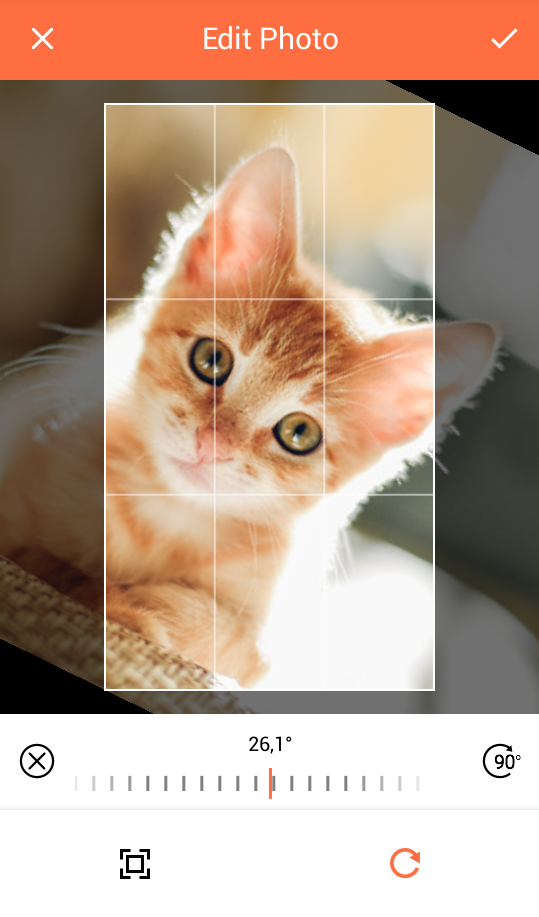
From the gallery, by opening the share menu to share it to Snapprefs (NOT Snapchat). You will be presented with a tool that will allow you to crop or rotate your picture to fit your needs.
From the Snapchat app, by pressing the share button next to the camera swap button.

Hint
If you don’t see it, enable Snapchat Integration.
A gallery selector where you’ll be able to choose the picture you want to share will appear.
Note
Selecting the picture with this method won’t let you crop or rotate your picture).
Afterwards, you will be redirected to Snapchat’s sharing screen
Warning
You MUST NOT edit or send your picture at this point !!
You will need to dismiss the sharing screen (by pressing the X on the upper right of the screen) to go back to the Snapchat camera view. Once in the camera view, you must press the round button to take a picture. Instead of displaying the current camera’s photo, the picture you chose to share will be shown as if you just took it.
You may then proceed to add captions, paint or stickers, and customize the viewing time, before adding the snap to your story or sending it to someone.
Tip
Sharing through Snapprefs won’t add any overlay to your picture, contrarily to sharing a gallery picture directly through Snapchat
Videos
Again, you have two ways to share a video :
From the gallery, by opening the share menu to share it to Snapprefs (NOT Snapchat)
From the Snapchat app, by pressing the share button next to the camera swap button, as if you were sharing a picture
Hint
If you don’t see it, enable Snapchat Integration.
A gallery selector where you’ll be able to choose the video you want to share will appear.
Afterwards, you will be redirected to Snapchat’s sharing screen
Warning
You MUST NOT edit or send your video at this point !!
You will need to dismiss the sharing screen (by pressing the X on the upper right of the screen) to go back to the Snapchat camera view. Once in the camera view, you must hold the round button to record a video. Instead of displaying the current camera’s video, the video you chose to share will be shown as if you just recorded it.
Data saving
Data Saving
Block Story Preload
Stories will not be preloaded
Block Discover Snaps
Discover will NOT load NOR download
Discover will show in the UI
Discover will NOT show in the UI
Hint
Previously downloaded/cached Discovers before enabling this feature will load. Also, the second option saves like 5kB more data, since it block brand logos from downloading.
Visual Filters / Filters
Visual
Click on a visual filer and tick to enable.
My Filters
An overview of your own Filters. When you click a Filter you will be able to delete it.Hint
Snapchat uses a lot of Memory, too many Filters causes it too lag, best practice is to keep the number low.
Reddit Filters
List of the Filters on Reddit. Click on it do download the Filter.
G+ Filters
Tab for the Filters in the Google Plus Community.
Lenses
Lenses
Lens Collection System
Enable to collect the Lenses.
Lens Loading System
Enable to have the collected Lenses loaded.
Select Lenses
Brings up the menu to enable or disable your collected lenses.
Enable Lenses when collected
Autoenables the collected lenses
Sorting Lenses by selection time
Sorts the Lenses by selection time
Hide current SC Lenses
Hides the Lenses currently provided by Snapchat and only shows your enabled Lenses
Merge Lens Databases
As there are many GEO Lenses, only active in a certain location around the world, it is very possible that someone else has collected different Lenses. Use this function to merge a downloaded Lenses.db with your own.